




You can change the display name of your WordPress account, which shows on WordPress posts and comments.
1. Log in to the WordPress dashboard.
2. From the Dashboard menu, go to Users and click on Profile.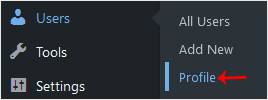
3. Locate Nickname and enter your new name.
4. From the Display name publicly as, choose your newly added nickname from the drop-down menu.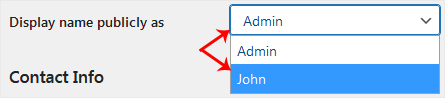
5. Scroll down to the bottom of the page and click on Update Profile.
The display name has been updated successfully. Your profile will now show the new name across your site.
