



To create a cPanel account, you need to create at least one hosting package. In WHM, you can easily create hosting packages.
1. Log in to your WHM Account.
2. Go to Account Functions >> Create a New Account or type Create in the menu filter box. The option will appear. Click on it.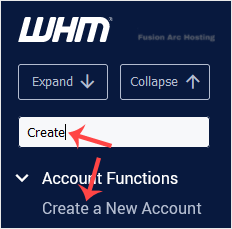
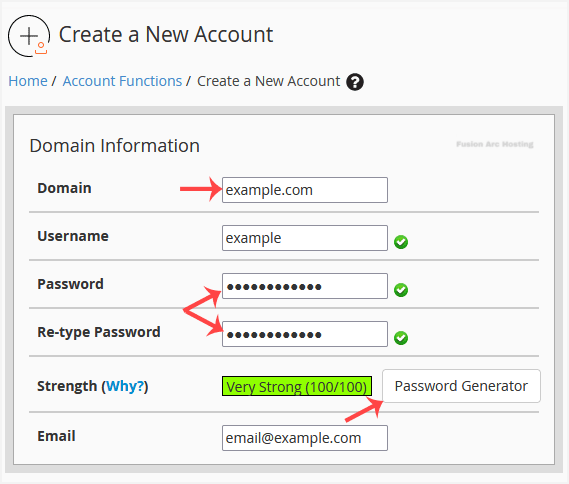
3. Enter the following details under Domain Information:
- Domain: The domain name you want to host, such as example.com.
- Username: Click anywhere on the blank area, and this field will be filled in automatically. You can also enter any other username you want to use.
- Password: Enter a password or use a password generator. Copy the password to a safe place. You will need it to access your newly-created account.
- Email: Your email address.
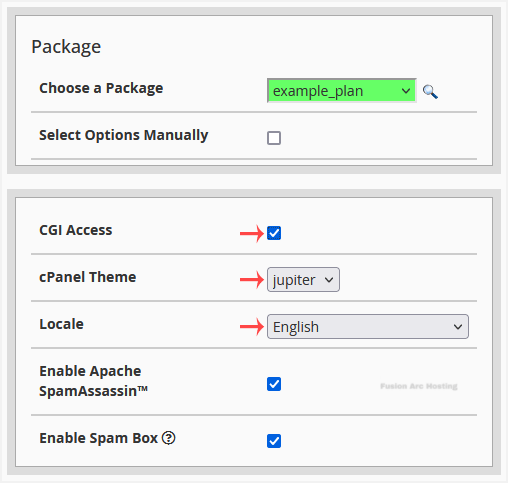
4. Under Package:
- Choose a Package: You can choose a package from the drop-down menu. If there isn’t an available one, you can create it from the Add a Package option.
- CGI Access: Tick this to enable CGI Access.
- cPanel Theme: You can leave it as it is or choose a theme you want to use for your cPanel user account.
- Locale: Select a language for your cPanel user account.
5. Under Reseller Settings:
- Make the account a reseller: Leave it unchecked if you do not want to grant reseller access to your cPanel account. This option is only available for root users.
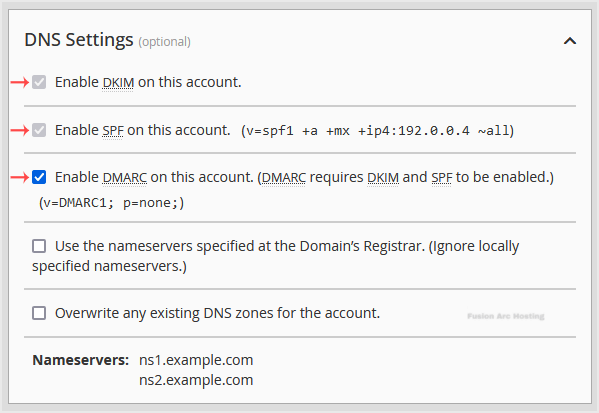
6. Under DNS Settings:
- Enable DKIM on this account: It is enabled by default. We recommend you to keep it enabled.
- Enable SPF on this account: Check this option to prevent abusers from sending spoof emails on behalf of your domain name.
- Enable DMARC: Enabled by default, and it requires DKIM and SPF to be enabled. If you disable DMARC, you can also disable DKIM and SPF.
7. Leave all other options as they are. Please, scroll down to the Create button and click it.
Your cPanel account will be created successfully.
