



You can include or exclude your domain from AutoSSL.
If your domain is newly-created, wait a few hours for the cPanel to automatically install an SSL on your domain. You can check the last log of AutoSSL from cPanel > SSL/TLS Status > Certificate Status.
1. Log in to your cPanel account.
2. In the Security section, click on SSL/TLS Status.
3. Under Domain, choose the domain you want to include. Then click on “Include x domain(s) during AutoSSL“. Selected domains/sub-domains will be included in AutoSSL.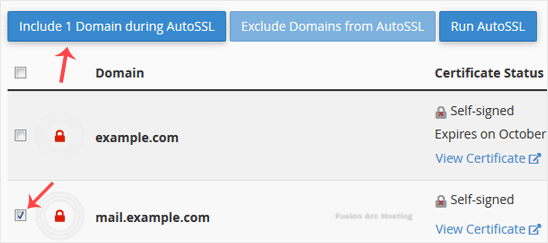
How to exclude a domain from AutoSSL?
1. Under Domain, check-mark the domains you want to exclude and click “Exclude X domains during AutoSSL.” Selected domains/subdomains will be excluded from AutoSSL.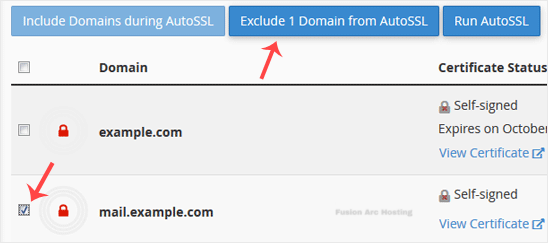
Note: You can only exclude domains that you previously included in AutoSSL.
