



Introducing Our New Google Ads PPC Management $20/mo

All Email Issues Resolved – All Systems Fully Operational

Award Winning Hosting Since 2017

Free Backups
Free Site Transfers
cPanel Included
Malware Protection
24/7/365 Support
Litespeed Servers
AI WAF Protection
DDOS Protection
2023-silver-top-25-best-wordpress-hosting (1)

How to Unsuspend cPanel User From WHM Account

Table of Contents

Looking for cPanel Web Hosting?
$ 4.95 /mo when you renew

You can unsuspend cPanel accounts from WHM. Follow this tutorial to unsuspend your cPanel user.

1. Log in to your WHM Account.

2. Go to Account Functions >> Manage Account Suspension or type Manage Account in the menu filter box. The option will appear. Click on it.
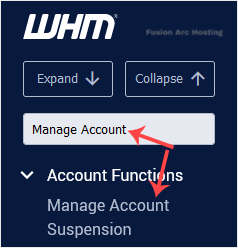
whm reseller manage account suspension menu

3. Select the suspended user or domain you wish to unsuspend, then click Continue to proceed.
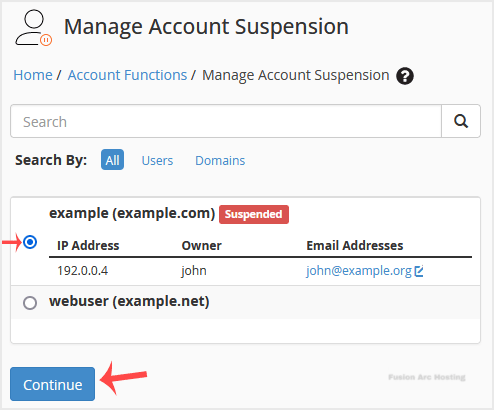
whm reseller unsuspend account

4. Finally, click on Unsuspend.

The account will be unsuspended, or an error message will be displayed in case of any problem.
