



Redirecting your website helps send visitors to another page or an external site. If you need to move your site or update links, follow the steps below to set up a redirect to an external website.
1. Log in to your cPanel account.
2. In the Domains section, click on Redirects.
3. Under Add Redirect, you should enter the following details and choose the appropriate options.
Type: Choose Permanent (301) or Temporary (302).
https?://(www.)? Leave this as it is, or should you want to redirect a directory or a page, enter the name of your directory or a full page in the text box.
Redirects to: Points to where you want to redirect your current domain or a page.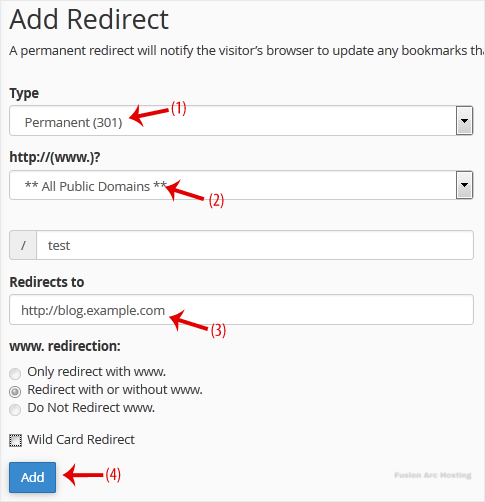
4. Click on Add.
That is it. We hope this tutorial is helpful to you.

