


Introducing Our New Google Ads PPC Management $20/mo

All Email Issues Resolved – All Systems Fully Operational

Award Winning Hosting Since 2017

Free Backups
Free Site Transfers
cPanel Included
Malware Protection
24/7/365 Support
Litespeed Servers
AI WAF Protection
DDOS Protection
2026-top-25-reseller-hosting
2023-silver-top-25-best-wordpress-hosting (1)

How to Check for New Email in Thunderbird

Table of Contents

Looking for cPanel Web Hosting?
$ 4.95 /mo when you renew

Thunderbird is an email client software. You can work with it in the following way.

1. Open Thunderbird.
mozilla thunderbird cpanel icon

2. In the left panel, you can see a list of your email accounts. Click on Inbox or if it is hidden, click on your email. It will expand to show the inbox, the trash list, etc. check email in thunderbird
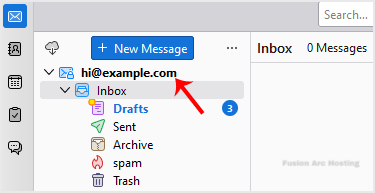
Another option is to right-click on the email address and choose Get Messages.

Thunderbird also automatically checks email every 5 to 10 minutes. It also does that automatically whenever you open the program.
