Introducing Our New Google Ads PPC Management $20/mo

All Email Issues Resolved – All Systems Fully Operational

Award Winning Hosting Since 2017

Free Backups
Free Site Transfers
cPanel Included
Malware Protection
24/7/365 Support
Litespeed Servers
AI WAF Protection
DDOS Protection
2023-silver-top-25-best-wordpress-hosting (1)

How to Disable the Two-Factor Authentication on Your cPanel Account

Table of Contents

Looking for cPanel Web Hosting?
$ 4.95 /mo when you renew

Follow this instruction to remove two-factor authentication from your cPanel account.


1. Log in to your cPanel account.


2. In the Security section, click on Two-Factor Authentication.cpanel two factor authentication icon


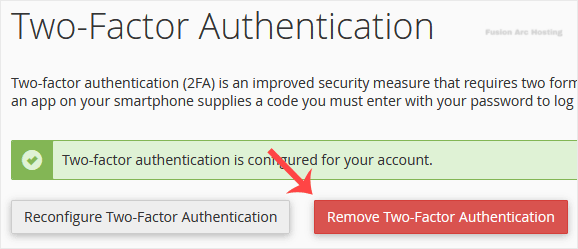
3. Click on Remove Two-Factor Authentication.cpanel two factor authentication disable

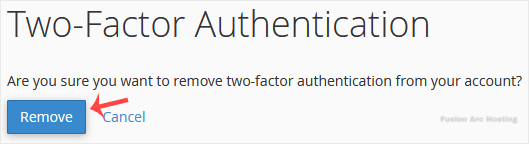
4. For confirmation, click on Remove.cpanel 2fa disable confirm

It should show a message such as Success: The system removed the two-factor authentication from your account.

You have disabled two-factor authentication on your cPanel account. Make sure to re-enable it later if you want to keep your account more secure.