



Introducing Our New Google Ads PPC Management $20/mo

All Email Issues Resolved – All Systems Fully Operational

Award Winning Hosting Since 2017

Free Backups
Free Site Transfers
cPanel Included
Malware Protection
24/7/365 Support
Litespeed Servers
AI WAF Protection
DDOS Protection
2026-top-25-reseller-hosting
2023-silver-top-25-best-wordpress-hosting (1)

How to Block Emails by Size Using Spam Filter in DirectAdmin

Table of Contents

Looking for cPanel Web Hosting?
$ 4.95 /mo when you renew

You can use a spam filter to block emails by size.

1. Log in to your DirectAdmin Account.

2. In the E-Mail Manager section, click on SPAM Filters. Alternatively, type SPAM Filters in the search bar, and the option will appear. Click on it.
da spamfilters icon

3. Under Block By, choose the Size option from the drop-down menu.

4. In Value, select the size in KB or MB and enter the value.
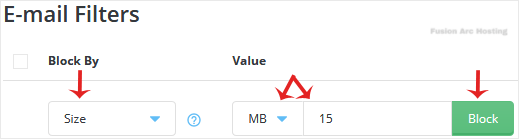
da blockby emailsize

5. Click on Block.

If you have chosen size in MB and have entered the value 5, all emails exceeding 5MB in size will be blocked.
