



Introducing Our New Google Ads PPC Management $20/mo

All Email Issues Resolved – All Systems Fully Operational

Award Winning Hosting Since 2017

Free Backups
Free Site Transfers
cPanel Included
Malware Protection
24/7/365 Support
Litespeed Servers
AI WAF Protection
DDOS Protection
2026-top-25-reseller-hosting
2023-silver-top-25-best-wordpress-hosting (1)

How to Create a Subdomain in SiteWorx

Table of Contents

Looking for cPanel Web Hosting?
$ 4.95 /mo when you renew

A subdomain is an additional part of your primary domain. For example, blog.example.com is a subdomain. Please, follow this tutorial to create a subdomain in SiteWorx.


1
. Log in to your SiteWorx account.

2. In the Domains section, click on Subdomain.sw subdomain icon


3. Click on the Plus icon or Add a Subdomain.sw subdomain plus icon


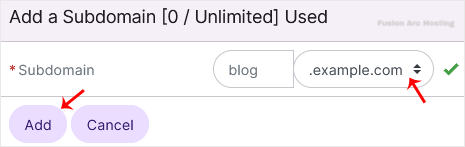
4. Enter your subdomain name, and choose the appropriate domain from the drop-down menu if there are multiple domains. Then click on Add.subdomain add

You should see a success message that the subdomain has been created.
