



Want to keep all your emails in one place? Forwarding helps you stay organized and never miss a message.
How to forward an email?
1. Log in to your cPanel account.
2. In the Email section, click on Forwarders and then click on Add Forwarder.
3. Enter the following details:
- Address to Forward: Enter the email address you want to forward. If you’re going to forward your myemail@example.com to a custom e-mail address, enter myemail in this field.
- Domain: Select the appropriate domain from the Domain drop-down list if you have multiple domains.
- In the Destination section, select Forward to email address and enter your e-mail address on which you want to receive forwarded emails.
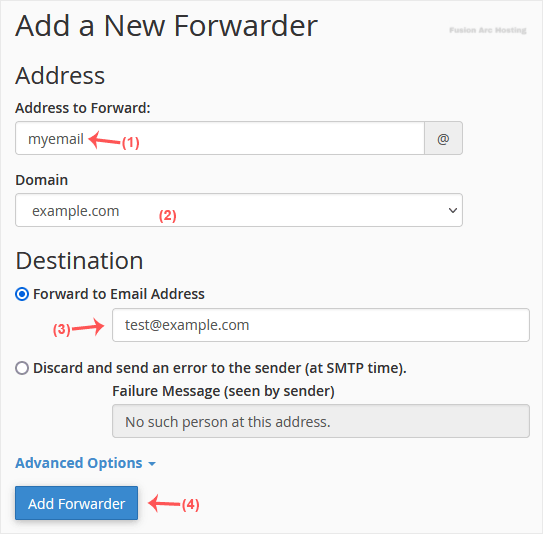
4. Click on Add Forwarder.
How to forward an email to a mail pipe script/program?
1. In the Email section, click on Forwarders and then choose Add Forwarder.
2. Enter the following details:
- Address to Forward: Enter the email address you want to forward.
- Domain: Select the appropriate domain from the Domain drop-down list if you have multiple domains.
3. In the Destination section, click on Advanced Options, select Pipe to a Program and enter the full path of your pipe script, such as home/username/public_html/myemailpipe.php. You may have noticed that we do not use a slash at the beginning of the URL.
4. Click on Add Forwarder.
Hope you found this article useful.

